

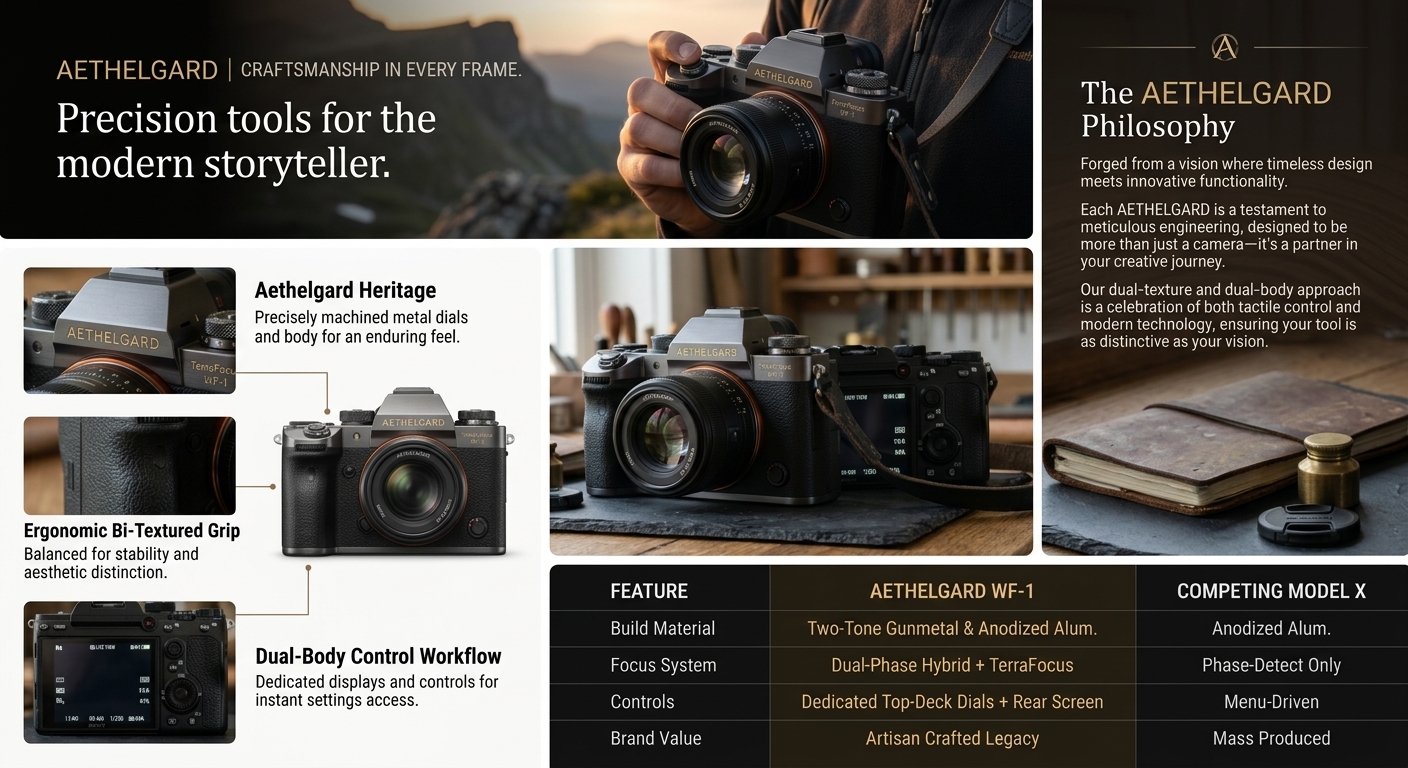
The Science of Selling: Why Amazon A+ Content Requires Flawless Visuals
In the hyper-competitive marketplace of Amazon, having an incredible product is only half the battle. The other half is presenting that product in a way that instantly builds trust, answers consumer questions visually, and elevates your brand above the sea of competitors. This is where Amazon A+ Content (formerly known as Enhanced Brand Content or EBC) comes into play.
According to Amazon's own internal data, implementing high-quality A+ Content can increase your conversion rates by anywhere from 5% to 20%. However, there is a critical caveat: the quality of the content dictates the quality of the conversion boost. Sticking generic white-background photos into EBC modules is a wasted opportunity. You need professional marketing visuals, lifestyle environments, and carefully crafted infographics.
Historically, acquiring these visual assets meant hiring professional photographers, renting studio space, sourcing props, and waiting weeks for a graphic designer to put it all together. With Nano Banana Image AI, you can generate pixel-perfect, hyper-realistic EBC images in seconds.
How Nano Banana Image AI Revolutionizes EBC Creation
Our specialized AI engine is fine-tuned for e-commerce excellence. When you use Nano Banana Image AI for your Amazon listings, you aren't just generating random pictures; you are utilizing an advanced artificial intelligence built to understand marketing psychology, compositional balance, and lighting.
- 1
Infinite Lifestyle Contexts
Need your coffee mug displayed on a rustic mountain cabin porch at sunrise? Or perhaps a sleek, minimalist Tokyo apartment? Nano Banana Image AI generates perfectly lit lifestyle composites without the travel or staging costs.
- 2
Built for Amazon Dimensions
Whether you need the standard 970x600px hero image, 300x300px module squares, or a 970x300px banner, our AI generates high-resolution imagery that crops beautifully into Amazon's strict template guidelines.
- 3
Negative Space Optimization
Great A+ content requires text overlays. By utilizing prompt commands in Nano Banana, you can easily command the AI to leave crisp, beautifully blended negative space on the left, right, or center of the image for your typography and selling points.
Crafting Professional Marketing Visuals: A Step-by-Step AI Strategy
To dominate your category, you need a cohesive visual strategy. Here is how top Amazon FBA sellers and e-commerce brand managers use Nano Banana Image AI to build out their Enhanced Brand Content.
Step 1: The Hero Banner (The Hook)
The top module of your A+ content should visually summarize the ultimate benefit of your product. Use the AI to generate a wide-angle lifestyle shot that evokes the emotion you want associated with your brand. Prompt tip: "Cinematic ultra-wide shot of [Product], luxurious lighting, hero angle..."
Step 2: The Feature Breakdowns (The Logic)
Next, create 3 to 4 smaller images (often used in standard single image and sidebar modules). Generate close-up, macro-level AI shots highlighting specific materials, textures, or UI features. Nano Banana excels at rendering photorealistic textures like brushed metal, matte plastic, or woven fabrics.
Step 3: The Cross-Selling Matrix
If you have a brand registry, you can use comparison charts. Generate consistent, studio-quality thumbnail images for every product in your lineup ensuring your comparison chart looks like it belongs to a Fortune 500 company, not a garage startup.
Mastering Prompt Engineering for E-Commerce Graphics
The secret to breathtaking Amazon marketing visuals lies in the prompt. When interacting with Nano Banana Image AI, think like an art director. Don't just ask for an object; specify the camera lens, the lighting conditions, and the mood.
// Example Pro Prompt for EBC Header Image
"Commercial product photography of a premium leather wallet sitting on a marble desk, soft diffused window light coming from the left, a blurred cup of espresso in the background, negative space on the right side of the image, hyperrealistic, 8k resolution, shot on 85mm lens, f/1.8 aperture, corporate luxury aesthetic."
By specifying "negative space on the right", you ensure that when you take this image into your graphic design software to add your Amazon infographics and bullet points, the text will be perfectly legible against the marble desk, rather than clashing with the focal product.